DIGITALPERSONA LOGON FOR WINDOWS offers robust multi-factor authentication, including PINs, one-time passwords (OTP), mobile push notifications, FIDO support, Passwordless Authentication, PKI integration, as well as fingerprint and facial recognition.
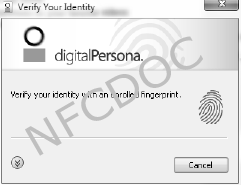


A key element within HID’s multi-factor authentication portfolio, transforms the way IT professionals protect the integrity of their digital organization by going beyond traditional two factor and multi-factor authentication.
technical overview of DigitalPersona Logon
🔐 Core Features
- Passwordless Authentication: Enables secure access to Windows systems using biometrics (fingerprint, face), smart cards, security keys, and mobile devices.
- Multi-Factor Authentication (MFA): Supports up to three authentication factors—something you know (PIN/password), something you have (smart card/security key), and something you are (biometrics).
- Active Directory Integration: Seamlessly integrates with Microsoft AD, Azure AD, and Lightweight Directory Services (LDS) for centralized user and policy management.
- Credential Management: Includes a Password Manager for storing and releasing credentials for websites, applications, and cloud services.
- Contextual Risk-Based Authentication: Factors like time, location, and device velocity can be used to dynamically adjust authentication requirements.
🧩 Architecture & Components
| Component | Description |
|---|---|
| DigitalPersona Server | Centralized storage and authentication engine |
| DigitalPersona Client | Provides MFA for Windows Logon and connects to the server for policy enforcement |
| Web Management Tools | Web-based interface for managing users, credentials, and policies |
| RADIUS Plugin | Adds MFA to VPN and remote access via Microsoft NPS |
| ADFS Extension | Enables MFA for federated logins using Active Directory Federation Services |
⚙️ Supported Authentication Methods
- Fingerprint and face recognition
- Smart cards and security keys (FIDO2, PKI)
- One-Time Passwords (OTP)
- Mobile push notifications
- Bluetooth devices
- Windows password and PIN
🚀 Deployment & Compatibility
- Rapid Deployment: Can be up and running in days, not weeks
- Scalable: Works for small networks or large enterprises with thousands of endpoints
- Supported OS: Windows 10, 11; Windows Server 2016, 2019, 2022
- VDI Support: Compatible with Citrix, VMware Horizon, and RDP environments
📊 Reporting & Compliance
- Logs security events and integrates with Microsoft Power BI for compliance reporting
main applications of DigitalPersona Logon
DigitalPersona Logon is designed to secure access across a wide range of environments.
🖥️ Windows Logon & Desktop Access
- Provides multi-factor authentication (MFA) for logging into Windows workstations
- Supports fingerprint, face recognition, smart cards, OTPs, and mobile push notifications
🌐 Web & Cloud Applications
- Integrates with SAML-enabled apps via its Identity Provider (IdP)
- Offers Single Sign-On (SSO) for seamless access to cloud services like Microsoft 365, Salesforce, and SharePoint
🔒 VPN & Remote Access
- Uses a RADIUS plugin to add MFA to VPNs and RDP gateways
- Compatible with Microsoft Network Policy Server (NPS)
🏥 Shared Workstations & Kiosks
- Ideal for environments like healthcare, retail, and call centers where multiple users share the same device
- Enforces individual authentication policies for kiosk-style logins
🧠 Legacy & Custom Applications
- Supports mainframe and custom-built apps through its Access Management API
- Enables MFA for older systems still critical to enterprise operations
📊 Compliance & Reporting
- Logs security events and integrates with Microsoft Power BI for audit and compliance reporting
👥 Identity Federation
- Supports WS-Federation, OpenID Connect, and SAML2P for federated identity management
If you need more details about this specific subject, MAIL TO
RELATED PRODUCTS